Lectrin™
A teleprompter built for live production. Write your script, roll it smoothly for your talent, and trigger ProPresenter slides right from the text as you speak.
$99.99 one time. No subscriptions.
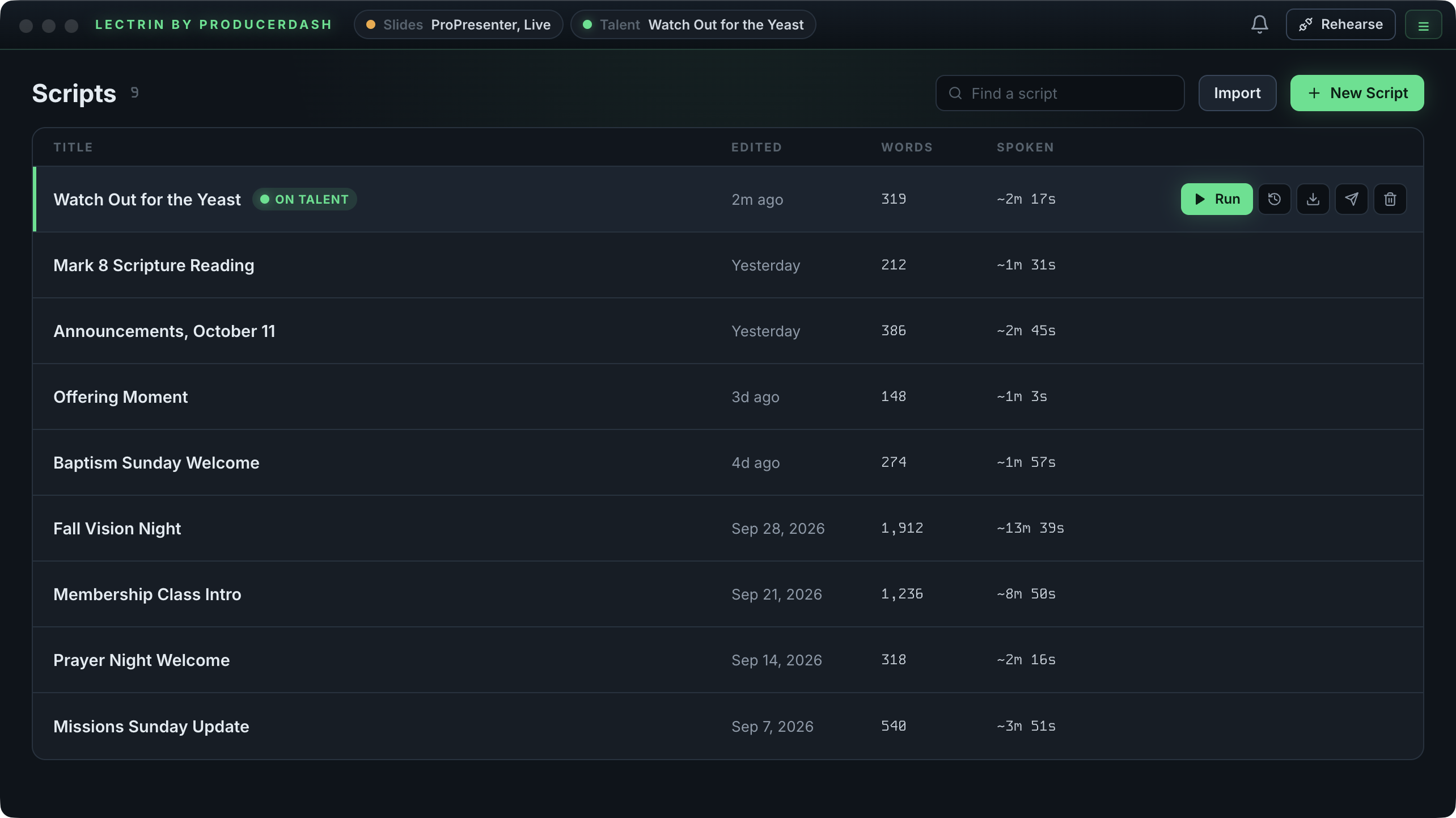
Operator Dashboard
All your scripts in one clean, high-contrast dashboard, with options to share, import, or create a new one.
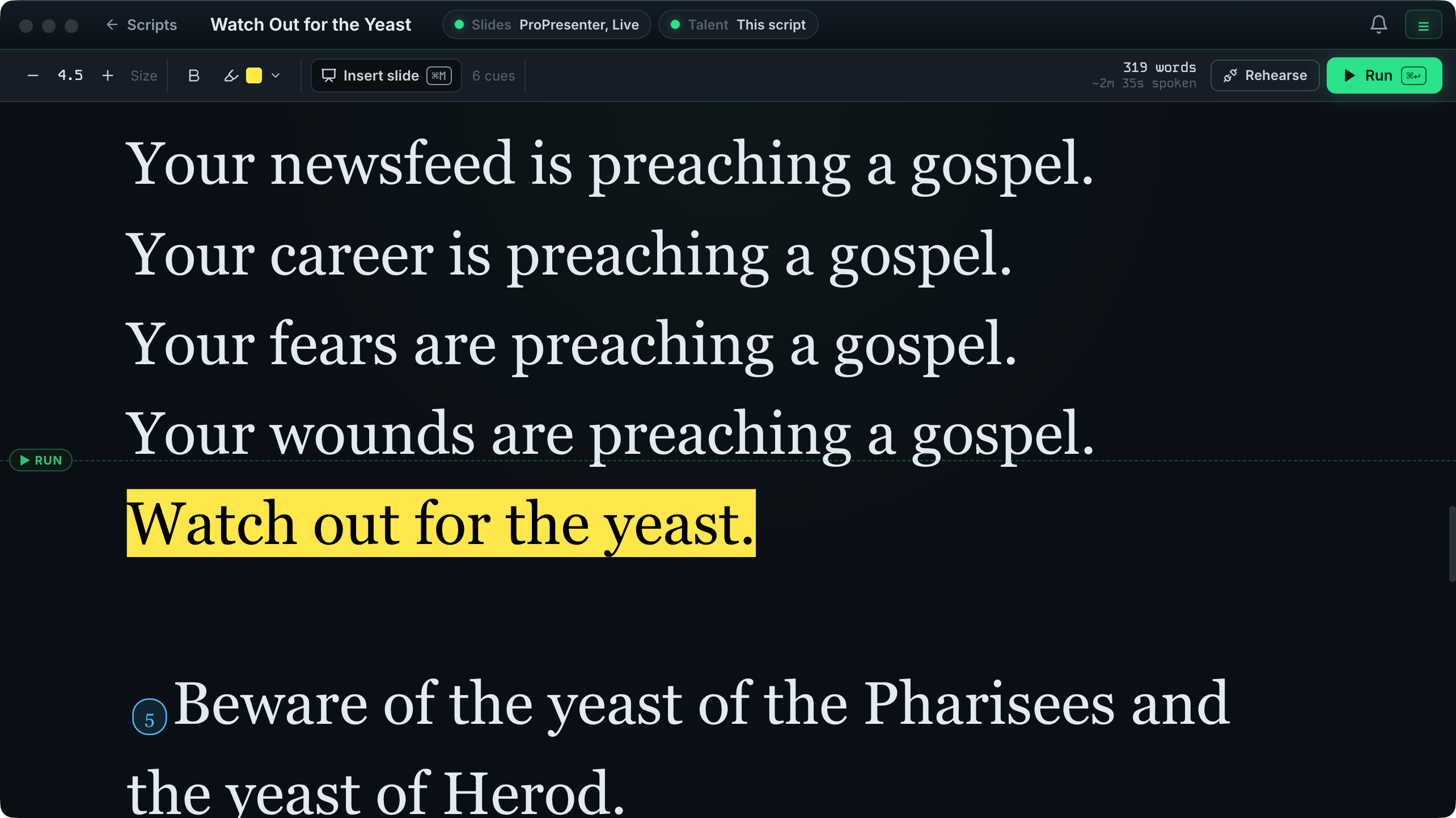
Script Editor
Write and edit your script with inline slide cues. Word count and estimated runtime update as you type.
Operator Control
Run the show from the operator window: live speed control with bump keys and mouse control, and even control your presentation right from your script.
Talent Window
The output your talent sees: full screen, high contrast, and a clear reading line. Smooth scrolling, and it can be controlled natively right from ProducerDash.
Everything you need to stay on script.
Live Teleprompter
A full-screen display with nothing but your text. Clean, high contrast, readable from across the stage. Any device on your local network can also stream the prompter in a browser.
Script Sharing Between Devices
Send a script straight to any other Mac running Lectrin on the same network. Click Send to another Mac on the script, pick the Mac, and it lands in their library. No exporting files or emailing them around.
USB Remote Compatibility
Plug in any standard USB presentation remote and map its keys to the controls you need: play or stop, speed up, slow down, jump back, and back to top. Run your script without touching your Mac.
Inline Slide Cues
Drop slide cues right into your script. When the prompter reaches a cue, Lectrin advances your slide for you, either directly in ProPresenter over the network or as a MIDI trigger, so your slides follow the script.
Import Word and PDF Documents
Point Import at a Word (.docx) or PDF file and Lectrin builds a brand new script from it, carrying your highlighting and bold across as on screen emphasis. Word files convert cleanly, PDFs are best effort, and it all runs on your Mac.
Before you download
Lectrin system requirements
- Mac
- Apple Silicon (M1 or newer)Intel Macs are not supported.
- macOS
- 12 Monterey or later
- Memory
- 8 GB of RAM or more
- Disk space
- About 450 MB
- Network
- Your local networkInternet is needed to activate, and each time it opens during the free trial.
- Works with
- ProPresenter 7 with Network turned on, for slide triggersOr any MIDI setup: a MIDI interface is only needed if you use MIDI output.
- License
- $99.99 one time, with a 7 day free trialCovers 2 Macs; extra seats are $29.99 each.
Up and running in 6 steps.
Download, install, and sign in
Sign in to your dashboard and download the latest Lectrin install file, then double click it and drag it into your Applications folder. On first launch, start your free trial or sign in to your existing account.
Create or import a script
Type or paste your script into the editor, or Import a Word (.docx) or PDF document and Lectrin converts it into a new script for you. It saves automatically as you write.
Choose how it drives your slides
In Settings, under Slide control, choose where your slide cues go: ProPresenter directly over the network (enter its IP, no MIDI hardware needed), MIDI to a connected interface, or both.
Add your slide cues (optional)
Right click in the script where you want a slide to fire and choose Insert slide here, then enter the slide number.
Select your font size and scroll speed
Drag the speed slider to match your natural speaking pace. Scroll your mouse wheel or trackpad over the script, or tap the arrow keys, to nudge the position live.
Go full screen and present
Double click anywhere within the talent window to go full screen for clean, clear, and high-contrast teleprompter output.
Lectrin is an independent tool and is not affiliated with, endorsed by, or sponsored by Renewed Vision or Microsoft. ProPresenter is a trademark of Renewed Vision, LLC. Lectrin talks to ProPresenter only through its public network API.