Stage Plot Viewer
A free companion app that finds ProducerDash on your network and shows its live stage plot on any screen. Set it at the side of stage, in the green room, or at front of house, and the whole team can glance up and know exactly where they stand.
Free with any account.
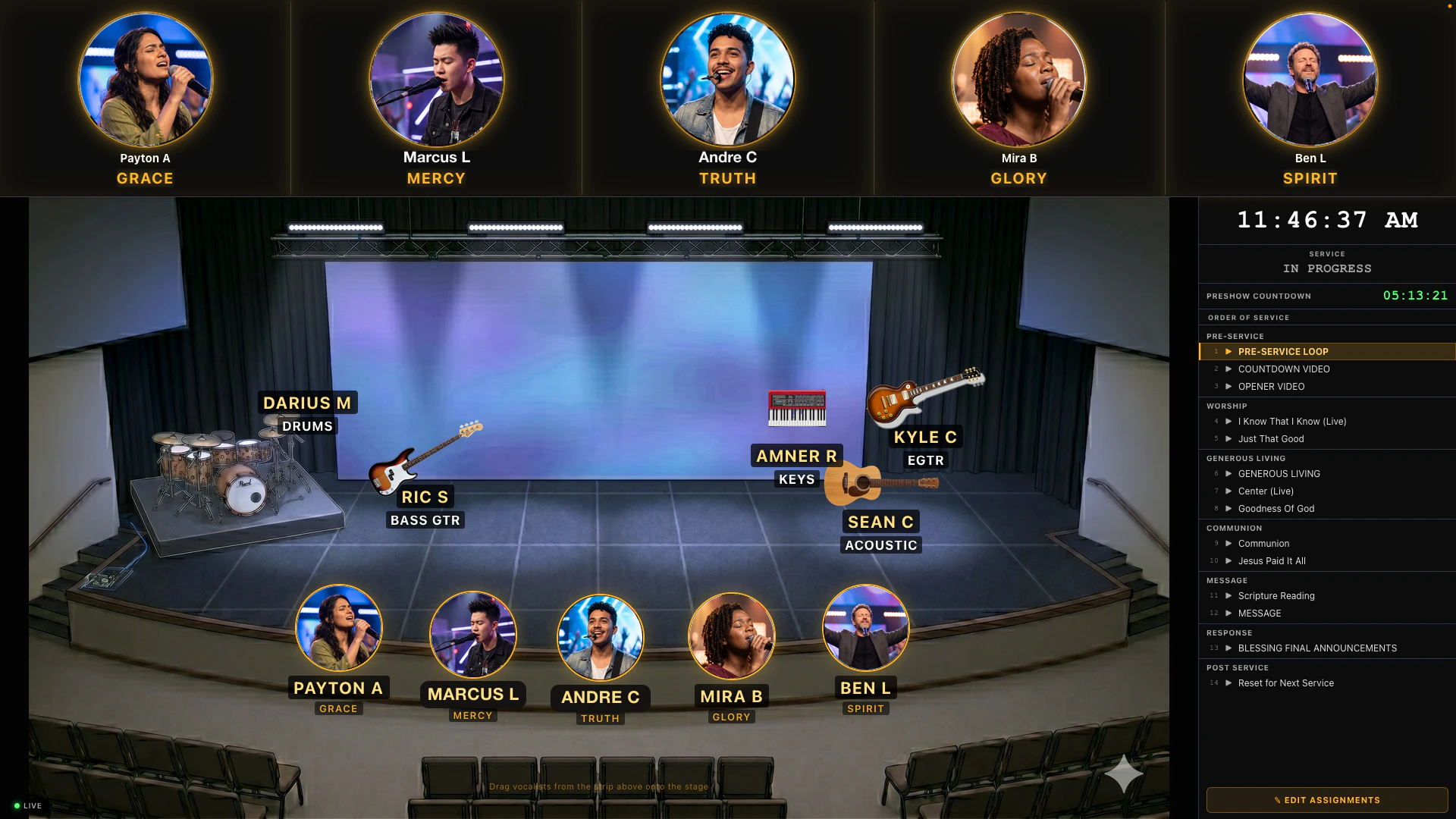
Your live plot, on any screen.
Stage Plot Viewer shows your stage exactly as ProducerDash publishes it: vocalists in their spots, the band on their instruments, every mic and IEM labeled, this week’s assignments, and a countdown to your next service. Anything you change on the ProducerDash machine shows up here within a second.
Your live stage plot, on every screen.
Finds ProducerDash on its own
There is no address to type and nothing to pair. When ProducerDash is running with the Stage Plot Portal on, it quietly announces itself on your local network and the viewer loads the live plot for you. If ProducerDash later restarts, sleeps, or its stage plot moves to a different port, the viewer notices and reconnects on its own.
Your live stage plot on any screen
It shows the plot exactly as ProducerDash publishes it: vocalists in their spots with their photos, band members on their instruments, every mic and IEM channel labeled, this week's assignments, and a countdown to your next service. Anything you change in ProducerDash shows up here within a second, so it stays current without anyone refreshing.
Edit from it too, not just watch
It is mainly a display, but it is not locked. It opens the same two way portal your team uses on their phones, so you can drag a vocalist or a band icon to a new spot, swap two people, or open Edit Assignments to change who is on which mic. Every change saves straight back to ProducerDash and updates everywhere at once.
Fullscreen for a stage display
Double click the plot for a clean borderless view that sits above everything else and keeps the display awake, so a screen saver or a notification never covers it mid service. Press Escape to come back out. It remembers its size, position, and which display it was on between launches.
Run it on as many screens as you like
Open it on any number of Macs at once. Each one finds ProducerDash on its own and shows the same live plot, so you can put one at the side of stage, one in the green room, and one at front of house, all in sync.
Free with any account
Anyone signed in at producerdash.com can download it, with no purchase needed. It is a window onto a running copy of ProducerDash, so keep it paired with a machine running ProducerDash on the same network.
System requirements
Stage Plot Viewer is a universal Mac app, so the same download runs natively on both Apple Silicon and Intel Macs, macOS 12 Monterey or later, with at least 8GB of RAM. It needs a machine on the same local network running ProducerDash 1.0.15 or newer with the Stage Plot Portal turned on. Free with any producerdash.com account.
Up and running in 4 steps.
Turn on the Stage Plot Portal in ProducerDash
On the ProducerDash machine, set up your stage under Settings then Stage Plot, then turn on the Stage Plot Portal under Settings then Stage Plot Portal.
Download Stage Plot Viewer
Sign in to your account, open the Downloads page, and grab Stage Plot Viewer from the free card. Open the DMG and drag it into your Applications folder.
Open it on the same network
Open Stage Plot Viewer on any Mac on the same local network. It shows a short searching screen for a moment, connects on its own, and displays the live plot.
Put it on a screen
Leave it as a normal resizable window, or double click the plot to fill a stage display edge to edge. It remembers where it was, so it always comes back where you left it. If it cannot find ProducerDash, type the address by hand from Settings then Stage Plot Portal.